
A Daycare Digital Bulletin Board Parents Actually Stop to Read
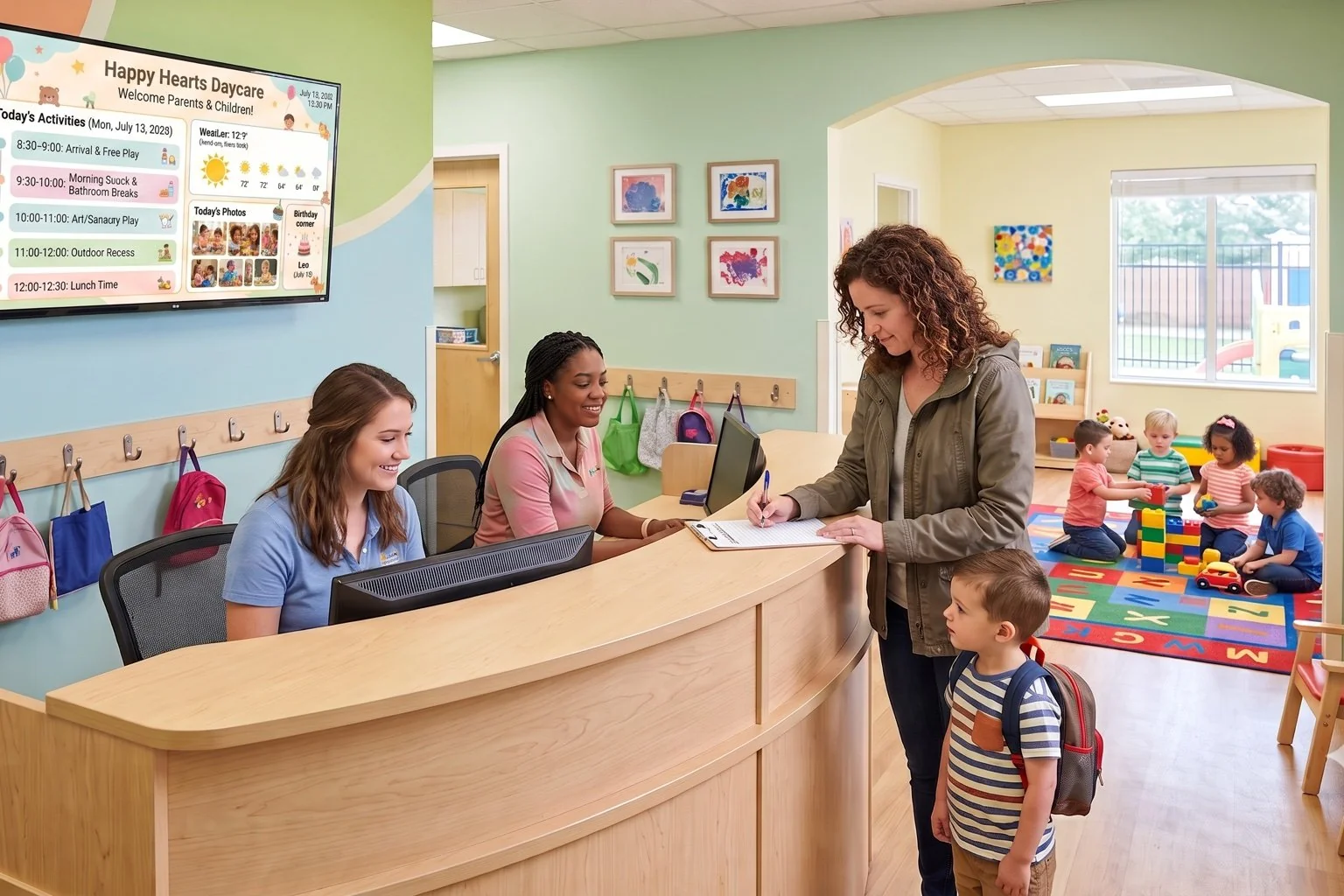
Mount a screen by the front door and give families the daily schedule, meals, reminders, and a photo from the day the moment they walk in. DAKboard is a warm, easy-to-update childcare announcement screen, not a security system. Staff enter the day's details once, and the board updates itself from there.
No credit card required. No proprietary hardware. Cancel anytime.
A parent-facing update board showing today's schedule, weather, and photos from the day.
Trusted on thousands of screens in daycares, preschools, and childcare centers welcoming families every day.
Replace the Paper Sign-In Sheet With Something Parents Trust
Give Every Pickup a Clear Picture
Parents grabbing a toddler at the end of a long day don't want to hunt for a clipboard. Show the day's schedule, lunch and snack menu, and a friendly reminder or two on one screen, right where drop-off and pickup happen.
Show the Moments, Not Just the Memo
Upload photos from craft time or the playground to the Media Library and let them rotate on screen. It's a small thing that means a lot to a parent who spent the day wondering how their kid's morning went.
Update It in Minutes, Not Between Classes
No design software, no laminator. A staff member edits the schedule or swaps a photo from a browser, on a break or between activities, and the board reflects it automatically.
From Empty Wall to Childcare Announcement Screen in One Afternoon

Lay out the board
Drag a Text block for the schedule and meals, a Media Library block for photos, and a Weather block onto a blank Custom Screen. No template to fight, just the sections your families actually check.

Add today's details
Type in the day's activities, the lunch menu, and any reminders using the Scheduled Text block, and drop in a few photos from the classroom. Staff can do this from a laptop or a phone's browser.

Mount it by the door
Open the private screen URL on a TV or tablet in the lobby, or plug in a DAKboard CPU if the screen has no browser or Wi-Fi. It keeps showing your board and refreshing itself all day.
Built for the Details That Matter to Parents
Daily schedule and meal menu, staff-entered
Text and Scheduled Text blocks let a teacher type in the morning's plan, nap time, and what's for lunch. It's simple manual entry, so it's exactly what your center wants families to see, nothing pulled from another system.
A rotating photo of the day
Upload snapshots from art projects or outdoor play to the Media Library and let them cycle on screen throughout the day, giving parents a warm glimpse of what their child was up to.
Weather and severe alerts built in
A native Weather block keeps the day's forecast on screen so parents know if it's an outdoor-play day, and it surfaces severe weather alerts automatically.
One screen or one for every room
Manage every classroom's board from one dashboard, with content refreshed automatically throughout the day so what's posted in the morning is what parents see at pickup.
LITTLE SPROUTS DAYCARE
From $5 Per Screen, Per Month
Essential starts at $5/month per screen billed annually (2 screens included, $4/month each additional), enough for a single lobby board. Running a screen in every classroom? Plus starts at $8/month per screen (3 screens included, $5/month each additional) and adds instant refresh and bulk management. Both plans include a 30-day free trial, no credit card required.
Compare PlansChildcare Announcement Screen Questions, Answered
Is this a security or check-in system?
No. DAKboard is a display for parent-facing information like the daily schedule, meals, and reminders. It doesn't include camera, surveillance, or check-in/check-out functionality, and it isn't meant to replace whatever attendance or security system your center already uses.
How do we get the daily schedule and menu onto the screen?
A staff member types it in. Text and Scheduled Text blocks let you enter the day's activities, meals, and reminders from a browser on a computer or phone, and the board displays exactly what was entered.
Can we show photos from the classroom?
Yes. Upload photos to the Media Library and set them to rotate on screen, so parents see a snapshot from the day's activities alongside the schedule and reminders.
How often does the board update?
Content refreshes automatically every 30 minutes on Essential and every 15 minutes on Plus, which also lets you push an instant update to every screen the moment you edit something.
What hardware do we need for a daycare digital bulletin board?
Any TV, tablet, or monitor with a web browser works in the lobby or a classroom. If a screen has no browser or Wi-Fi, add a plug-and-play DAKboard CPU from $99. No proprietary hardware required.
Can we run a different board in every classroom?
Yes. Each screen can show its own schedule and photos, and you manage every classroom's board from one dashboard, with bulk screen management and staff accounts available on the Plus plan.
Give Families a Warmer Way to Stay in the Loop
Set up your first daycare digital bulletin board this week and let parents see the schedule, meals, and a photo or two the second they walk through the door. Free for 30 days.
Start For Free