
Turn an Old Monitor Into a Family Calendar Monitor
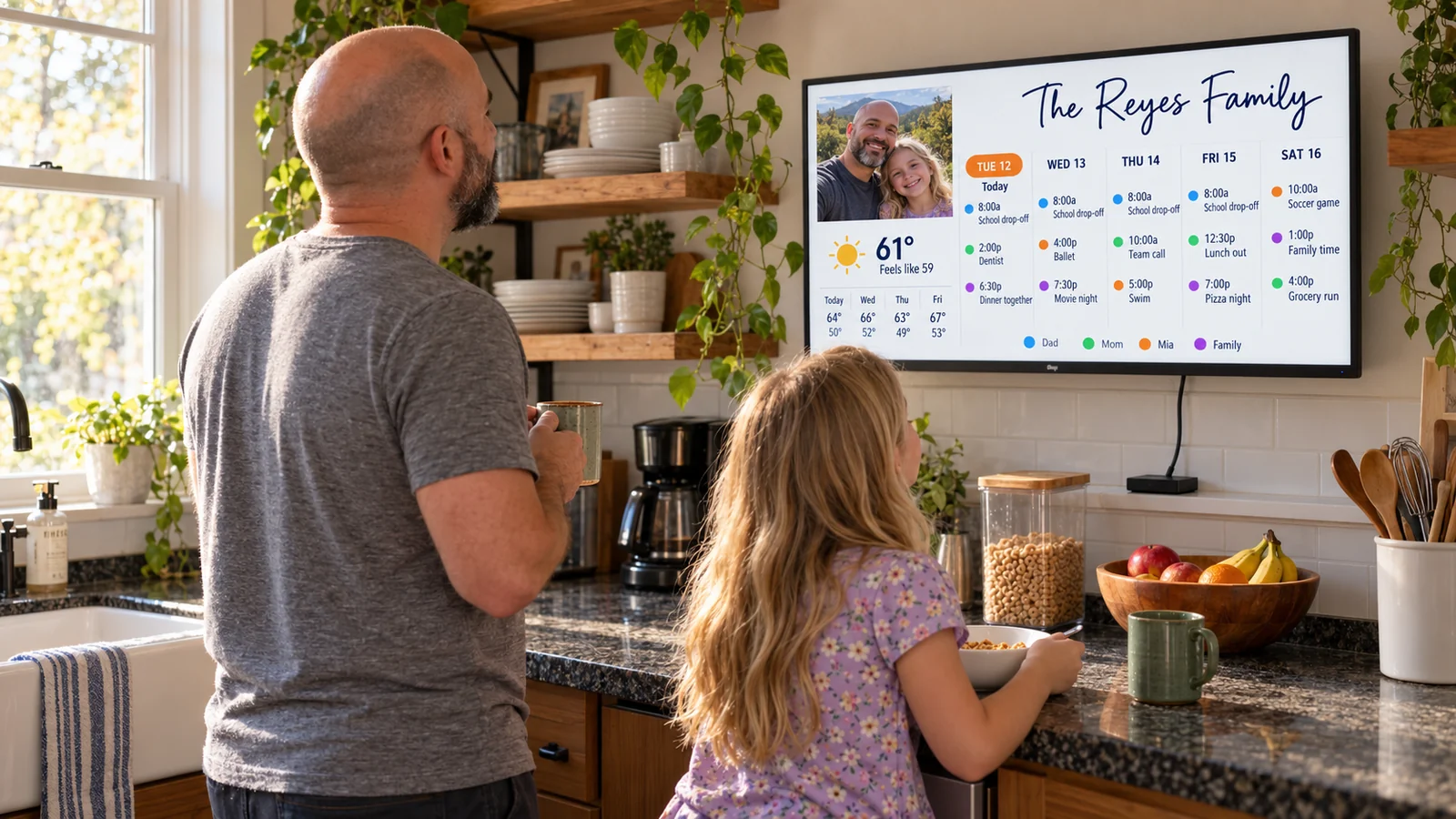
That monitor in the closet only needs one thing to become a calendar display: something to drive it. Plug in a DAKboard CPU, connect the calendars your family already keeps, and the week is on the wall, updating itself, so nobody rewrites a whiteboard again.
CPUs from $99.95, 30-day satisfaction guarantee. Free forever software plan, no credit card needed.
Build your very own calendar monitor from an old piece of hardware.
Loved by 300,000+ Families Worldwide

From Old Screen to Your Family's Calendar Display Monitor
We know you have an old monitor somewhere in your house. What you don't know is that it's half a calendar display already. It has the screen, the size and the sharp text. What it does not have is a computer or an internet connection, which is why it has been sitting in a closet since the laptop replaced it.
A DAKboard CPU is the missing half. It is a small box that plugs into the monitor's HDMI port, connects to your Wi-Fi, and pulls your screen from your DAKboard account. Nothing to install, nothing to keep running on a computer somewhere else in the house.
- Works with any monitor or TV that has an HDMI input
- CPUs start at $99.95, with a 30-day satisfaction guarantee
- Runs on the free plan, or Essential or Plus for custom layouts and more screens
What a Calendar Display Monitor Can Show
Everything the household needs to look at, in one place, updating automatically.
Everyone's calendars, merged
Run it as a Google Calendar monitor, or combine Google Calendar, Outlook and Office 365, Apple iCloud, Cozi, TeamSnap and any iCal link into one view with a color for each person.
Weather, photos and more
The forecast with alerts and live radar, photos from Google Photos or Apple Photos, plus 90+ integrations including full-screen Home Assistant on every plan.
It keeps itself current
Add an event on your phone and it appears on the monitor. Change the layout in your browser and the screen picks it up. Nobody touches the monitor again.
Landscape or portrait
Hang it wide like a calendar board or turn it upright like a noticeboard. With Essential or Plus you choose the layout, the colors and what gets the most space.
Up and Running in Under 15 Minutes
A monitor, an HDMI cable, a power socket and a DAKboard CPU.

Connect your calendars
Create a free DAKboard account on your laptop, connect the calendars your household keeps (even the kids' school calendars), and assign each person a color.

Pick what goes on screen
Start with a ready-made layout and add weather or photos. With Essential or Plus, move anything anywhere and choose your own colors.

Plug in the CPU
HDMI into the monitor, power into the wall, connect to Wi-Fi, and your screen appears. It runs on its own from then on.
One Screen for the Family, Another for Your Desk
Most households have more than one old monitor. Essential and Plus run more than one screen from the same account, each showing something different.
The kitchen screen carries the family week. The one in the home office shows only your work calendar and the pickup time you keep forgetting. A third at the grandparents' house shows nothing but photos of the children.
You manage all of them from your own account, in a browser, without walking into the room.

The Mental Load Does Not Have to Live in One Person's Head
When the whole week is on the wall, nobody has to be the family calendar.
Less Asking. More Knowing.
"This was a game-changer for our household! No longer having to copy whiteboard calendars each week for 4 people and a business! Even the kids have learned to check the DAKboard to see what's happening for each one. Life saver!"
Jannette M., verified customer
Worth the Peace of Mind.
"Purchased and spun up DAKboard to help keep some sanity in the house. Super simple to sync up our family's calendars. Had an issue that I couldn't resolve and their support team walked me through the fix within 24 hrs. 5 Stars!"
Jess P., verified customer
It Grows With the Family.
"This is our second DAKboard. Our first died after years of use, and the family collapsed into chaos. We replaced it as quickly as possible because this is essential equipment for a busy family. I recommend wholeheartedly."
Torree M., verified customer
Choose Your Setup
Every DAKboard needs a screen, something to drive it and a DAKboard account. You already have the screen.
Your monitor plus a DAKboard CPU
A small preconfigured box that turns any HDMI screen into a DAKboard. Plug it in, connect to Wi-Fi, done.
- CPU Mini $99.95, CPU v4 $169.95, CPU v5 $199.95
- Works with any monitor or TV with HDMI
- 30-day satisfaction guarantee
- A plain monitor is not a touchscreen, so TouchHub (the chores chart, the Home Assistant app and the touch dock) needs a DAKboard Wall Display or any touchscreen tablet, an iPad included
Or a screen built for it
- DAKboard Wall Display, from $699.95. A 22-inch or 27-inch touchscreen with the computer built in, so chores and touch controls work too.
- Already have a tablet? That works as a smaller screen on the free plan.
Got a tinkerer in the house? A Raspberry Pi with our free DAKboard OS drives the same monitor. See the Raspberry Pi setup
Calendar Monitor Questions, Answered
Will my old monitor work?
If it has an HDMI input and it turns on, yes. Age does not matter much, and neither does the brand. A DAKboard CPU plugs into the HDMI port and does the rest.
Do I need to leave a computer running?
No. The CPU is the computer, and it is the size of a deck of cards. Nothing else in the house needs to stay on, and your laptop can be closed or somewhere else entirely.
Can I tap the screen to check things off?
Not on a plain monitor, because it is not a touchscreen. Touch features like the chores chart need a touchscreen, which means a DAKboard Wall Display or a tablet. Everything else, including the calendars, photos and weather, works the same on a monitor.
What does it cost?
The hardware is a one-off: CPU Mini $99.95, CPU v4 $169.95, CPU v5 $199.95. The software has a free forever plan with no credit card needed. Essential and Plus add custom layouts, all 90+ integrations and more than one screen, from only $5 per month.
Can I use it as a Google Calendar monitor and show Outlook too?
Yes. A Google Calendar monitor is the most common setup, and Outlook and Office 365, Apple iCloud, Cozi, TeamSnap and any iCal or ICS link all show on the same screen beside it, each in its own color, so it does not matter what everyone in the house uses.
Can I mount the monitor on the wall?
Most monitors have standard VESA mounting holes on the back, so an ordinary wall bracket works. The CPU is small enough to sit behind the screen or on a shelf below it.
Go and Get the Monitor Out of the Closet
One small box, one HDMI cable, and the whole family can see the week.