
Assisted Living Digital Signage Everyone Can Actually Read
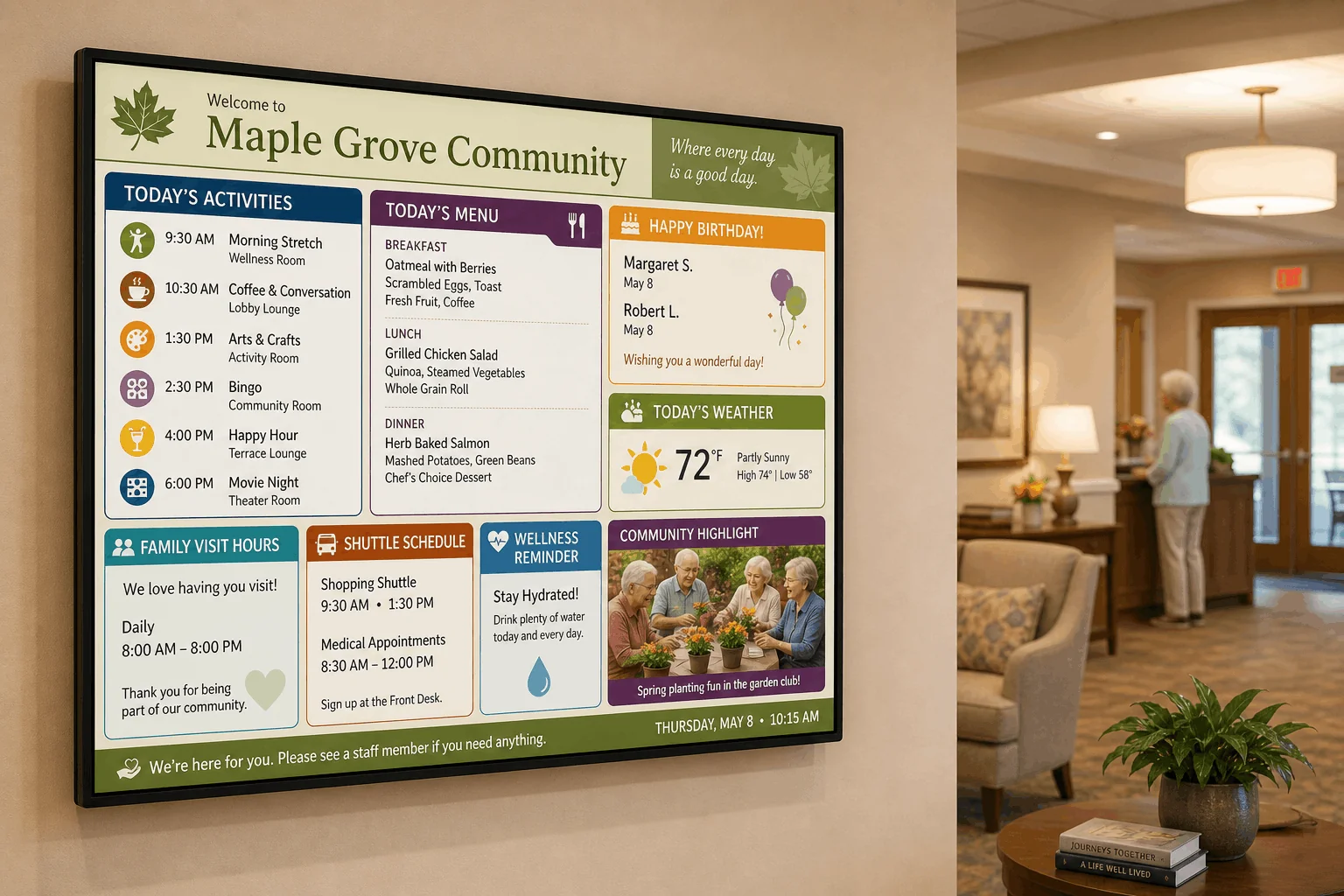
Replace the printed senior living bulletin board with a screen residents, families, and staff can read from across the room. Set large fonts and high-contrast colors once in the editor, then update activities and menus from anywhere, without reprinting a page.
No credit card required. No proprietary hardware. Cancel anytime.
A board residents can read from their chair, not just up close.
Trusted on thousands of screens in senior living communities, lobbies, and offices worldwide.
A Senior Living Bulletin Board That Doesn't Need Reprinting
Text Sized for Real Eyesight
Paper flyers taped to a corkboard get harder to read every time someone photocopies a photocopy. DAKboard's editor lets your team set large fonts, bold weights, and high-contrast colors once, directly in the custom CSS and font controls, so activities and menus stay legible from across the lounge.
Update It Without a Printer
Activity calendars change. Menus shift. A resident's birthday needs adding at the last minute. Instead of retyping and reprinting a page, your activities director edits the screen from a laptop or phone browser and the board reflects it on its next automatic refresh.
One Screen, Every Family Update
Visit hours, shuttle times, wellness reminders, and today's weather all live on the same board residents and visiting families already check. No separate binder at the front desk, no outdated sign taped to a wall from three activities ago.
From Corkboard to Community Screen in an Afternoon

Build your layout
Drag on blocks for today's activities, the daily menu, weather, and a text block for visit hours or shuttle times. Set fonts and colors large and high-contrast with custom CSS, once, for the whole board.

Hand editing to your team
Create staff accounts with role-based permissions so an activities director or front desk coordinator can update content without touching the calendar or family-visible pricing details.

Mount it in the common area
Use a TV, tablet, or monitor you already own, or add a plug-and-play DAKboard CPU if the screen has no browser or Wi-Fi. Repeat across the dining room, lobby, and each wing with bulk screen management.
Built for Readability and Easy Remote Management
Custom fonts and high-contrast color control
The drag-and-drop editor supports custom CSS and custom fonts, so you can push text sizes and color contrast well past a typical flyer without fighting a template.
Bulk screen management across the building
A community director managing displays in the dining hall, lobby, and activity room can push the same layout, or wing-specific content, to every screen from one dashboard instead of visiting each one.
Instant Display Refresh when plans change
Content otherwise refreshes automatically on a schedule, but Plus lets you push a change out immediately when an activity gets rescheduled or a menu swap happens at the last minute.
Staff accounts with role-based permissions
Give the activities coordinator access to edit the day's schedule while keeping account settings and other screens locked to the director. Everyone touches only what they need to.
Welcome to Maple Grove
- Morning Stretch9:30
- Arts & Crafts1:30
- Bingo2:30
- Movie Night6:00
- Lunch: Chicken Salad
- Dinner: Baked Salmon
- Dessert: Chef's Choice
- Daily, 8:00 AM to 8:00 PM
- Shopping9:30
- Medical Trips12:00
From $5 Per Screen, Per Month
Essential starts at $5/month per screen billed annually (2 screens included, $4/month each additional). Communities running screens in several common areas often prefer Plus, from $8/month per screen billed annually (3 screens included, $5/month each additional), for Instant Display Refresh and Bulk Screen Management. Both plans include a 30-day free trial, no credit card required.
Compare PlansAssisted Living Digital Signage Questions, Answered
Is DAKboard ADA-certified or an accessibility product?
No. DAKboard doesn't market a formal "accessibility mode." What it offers is a flexible editor: custom CSS and custom fonts let your team set large text and high-contrast colors on your own screen design, which many communities use to improve readability well beyond a printed bulletin board.
Who can update the activity board day to day?
Anyone you give a staff account to, with role-based permissions to control what they can see and change. An activities director or front desk coordinator can edit the day's content from a laptop or phone browser without needing access to billing or other screens.
How often does the board refresh?
Content refreshes automatically every 30 minutes on Essential and every 15 minutes on Plus. On Plus, Instant Display Refresh also lets staff push a change out immediately instead of waiting for the next cycle.
Can we manage screens in multiple wings or common areas from one account?
Yes. Bulk Screen Management on Plus lets a community director control every display, whether that's the dining hall, lobby, or a specific wing, from one dashboard instead of visiting each screen in person.
What hardware do we need?
Any TV, tablet, or monitor with a web browser works. If a screen has no browser or Wi-Fi, add a plug-and-play DAKboard CPU from $99. No proprietary hardware is required, and the browser-based editor works fine on a phone if you're updating content on the go.
Can we show family visit hours and shuttle schedules alongside activities?
Yes. Text and Scheduled Text blocks suit information that changes occasionally, like visit hours or shuttle times, and sit right next to your activities calendar and menu blocks on the same screen.
Give Your Community a Board Residents Can Actually Read
Set large, high-contrast text once, then let staff update activities, menus, and birthdays from anywhere, no reprinting required. Try it free for 30 days.
Start For Free