
An Airbnb Digital Welcome Board Guests Actually Read
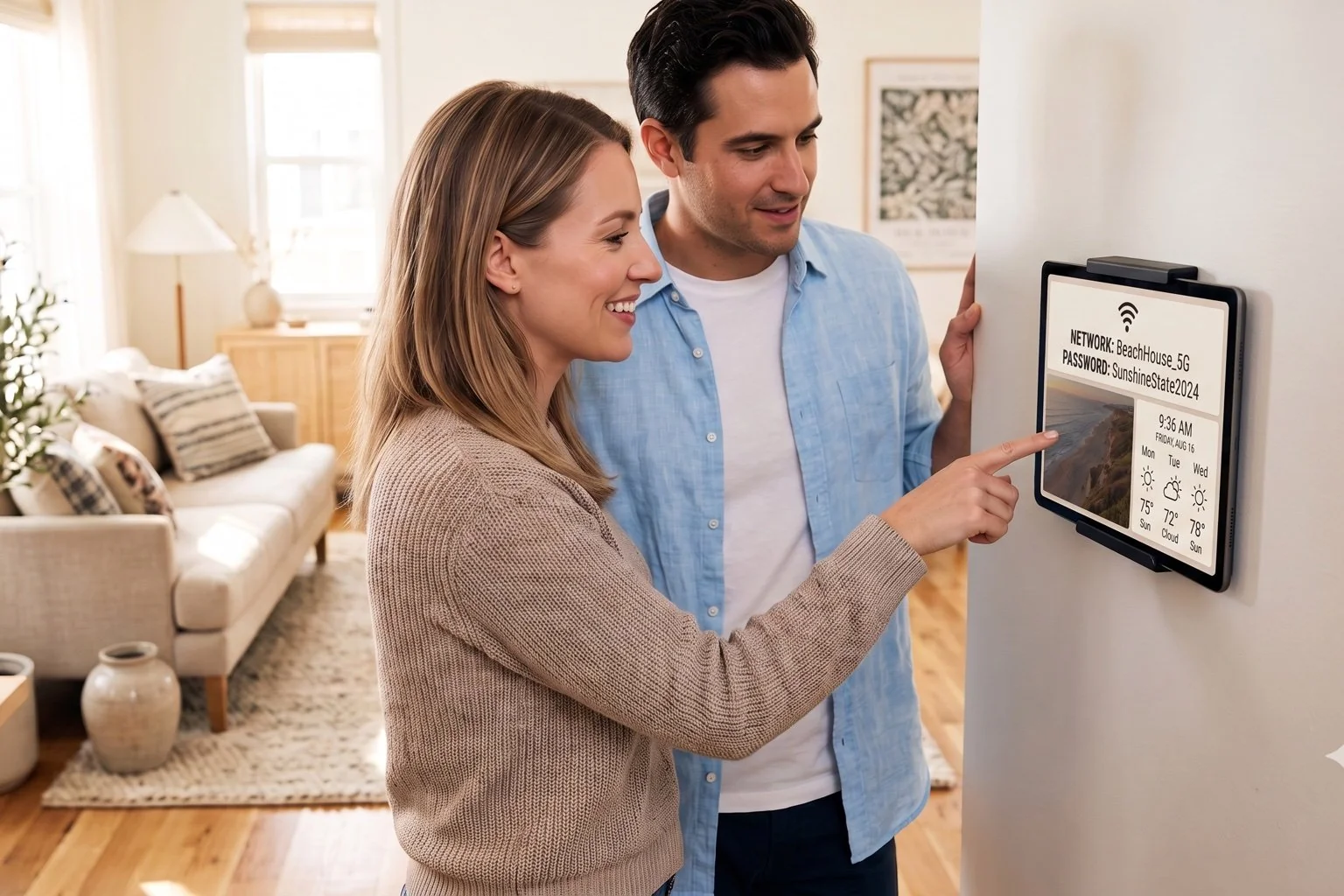
Stop texting the wifi password at midnight. Mount a screen by the door with checkout time, house rules, and your favorite coffee spot already on it. DAKboard turns any TV or tablet into a digital guest book screen you update yourself, no property management sync required.
No credit card required. No proprietary hardware. Cancel anytime.
A wall-mounted welcome screen with the wifi password and weather guests actually need.
Built for the fast-growing world of short-term rental hosting, from single cottages to multi-property portfolios.
Answer the Same Five Questions Before Guests Even Ask
Fewer Messages, Fewer Interruptions
Wifi password, checkout time, and trash day are the same three texts every host gets on repeat. Put them on a screen by the entryway instead, and guests find the answer themselves instead of messaging you from the couch.
A Small Touch That Reads as Hospitality
A named welcome screen with your favorite coffee shop and hiking trail on it feels like a boutique hotel, not a rental unit. Guests notice the extra care, and that impression tends to show up in the review.
You're Always in Control of the Content
DAKboard doesn't connect to Airbnb or VRBO to pull bookings or guest names automatically. You type the house rules, door code, and local guide yourself, and swap them in seconds when something changes.
Set Up Your Digital Guest Book Screen Before Your Next Turnover

Type up your house info once
Add text blocks for wifi, door code, checkout time, and house rules. Drop in photos of your favorite restaurant or trailhead from the Media Library. It's manual entry, but it only takes a few minutes to set up.

Style it to match the property
Custom fonts and CSS let a beach bungalow look breezy and a mountain cabin look rustic. Add your weather block so guests can glance at the forecast before heading out for the day.

Mount it and hand off the remote
Use a spare tablet or an old TV with a browser, or add a plug-and-play DAKboard CPU if the screen has neither. Update the content remotely between guests from your phone.
Everything a Guest Looks Up in the First Ten Minutes
Wifi, door codes, and rules in one place
Text and Scheduled Text blocks hold the details guests dig for first. Edit them the morning of a new check-in and the change appears the same day.
Local weather, with severe alerts
The weather block shows the day's forecast and surfaces severe weather alerts, useful for guests deciding whether to hit the beach or the trail.
A rotating photo tour, not just text
Screen Loops rotate between a welcome screen, a photo slideshow of the property or nearby attractions, and your local recommendations, all on one display.
Update from your phone between guests
The browser-based editor works from a phone, so you can tweak checkout instructions or swap a recommendation from the car on your way to the next cleaning.
The Willow Creek Cottage
From $5 Per Screen, Per Month
Essential starts at $5/month per screen billed annually (2 screens included, $4/month each additional), plenty for a single listing. Managing a few properties? Plus starts at $8/month per screen (3 screens included, $5/month each additional) and adds bulk screen management for hosts running more than one unit. Both plans include a 30-day free trial, no credit card required.
Compare PlansAirbnb Digital Welcome Board Questions, Answered
Does DAKboard connect to Airbnb or VRBO directly?
No. DAKboard doesn't sync with Airbnb, VRBO, or any booking platform or property management system. You enter guest-facing details like wifi, checkout time, and house rules yourself through the editor, so nothing pulls a guest's name automatically from a reservation.
Is this a digital guest book guests can sign?
Think of it as a digital guest book screen guests read rather than sign. It displays the information you'd normally leave on a laminated sheet on the counter: wifi, rules, checkout, and local picks, kept current by you.
How do I update the wifi password or checkout time between guests?
Open the browser-based editor from your phone or laptop and edit the text block. Changes are refreshed automatically on screen within 30 minutes on Essential or 15 minutes on Plus, with an instant manual push available on Plus.
What hardware do I need for a rental welcome screen?
Any TV, tablet, or monitor with a web browser works, including an old tablet you already have lying around. No browser or wifi on the screen? Add a plug-and-play DAKboard CPU from $99.
Can I manage welcome screens across several listings from one account?
Yes. Design one screen and reuse it as a template for other units, or build a unique screen per property. Plus adds bulk screen management, so hosts running multiple listings can push updates without visiting each one.
Give Every Guest a Warmer Welcome
A screen by the door with the wifi password, checkout time, and your favorite taco spot on it saves you messages and gives guests one more reason to leave five stars. Set it up before your next check-in, free for 30 days.
Start For Free