DAKboard vs Skylight Locked-in touchscreen, or a display that runs on your terms?
A family calendar display sounds simple until you dig into what's included and what costs extra later. This page walks through hardware, features, and real monthly cost for both options, so you know what you're signing up for before you buy.

No card needed to start · free for 30 days · leave whenever you want
The verdict, in 30 seconds
Both are good products. They serve different families.
Best for flexibility & long-term value
Pick DAKboard if you want to use your own hardware, customize everything, and pay less.
- Use any screen - iPad, smart TV, Raspberry Pi, or our wall display
- 100+ integrations - calendars, photos, smart home, todos, weather, transit
- Pixel-level layout control - drag, drop, resize anything
- Free photo display - Google Photos, Apple Photos, Flickr, more
- Plans start at $0 - Essential is $5/mo annual
Best for one-tap simplicity
Pick Skylight if you want a single device, ship-and-mount setup, and don’t mind paying a yearly fee.
- Plug-and-play touchscreen - works out of the box
- “Sidekick” AI - turns photos of paper schedules into events
- Built-in meal planner & grocery list
- Proprietary hardware only - no BYOD option
- Photos & chores locked behind paid subscription
A flexible digital dashboard for the way your family actually lives.
DAKboard is a highly customizable digital dashboard for families and businesses who want full control over their home or office command center. With 100+ third-party integrations and pixel-level layout freedom, you can:
- See multiple calendars in one view - everyone knows what’s happening that day, week, and month
- Check weather, traffic, and incoming package deliveries at a glance
- Display household chores everyone can check off via touchscreen
- Manage smart-home devices through Home Assistant or SmartThings
- Show family photos from Apple Photos, OneDrive, Flickr, Dropbox, Immich, and more
- Stream media from Spotify, YouTube, Reddit, and more
And the hardware? Your call. Buy our wall display, or repurpose an old tablet, smart TV, or Raspberry Pi into a digital command center.
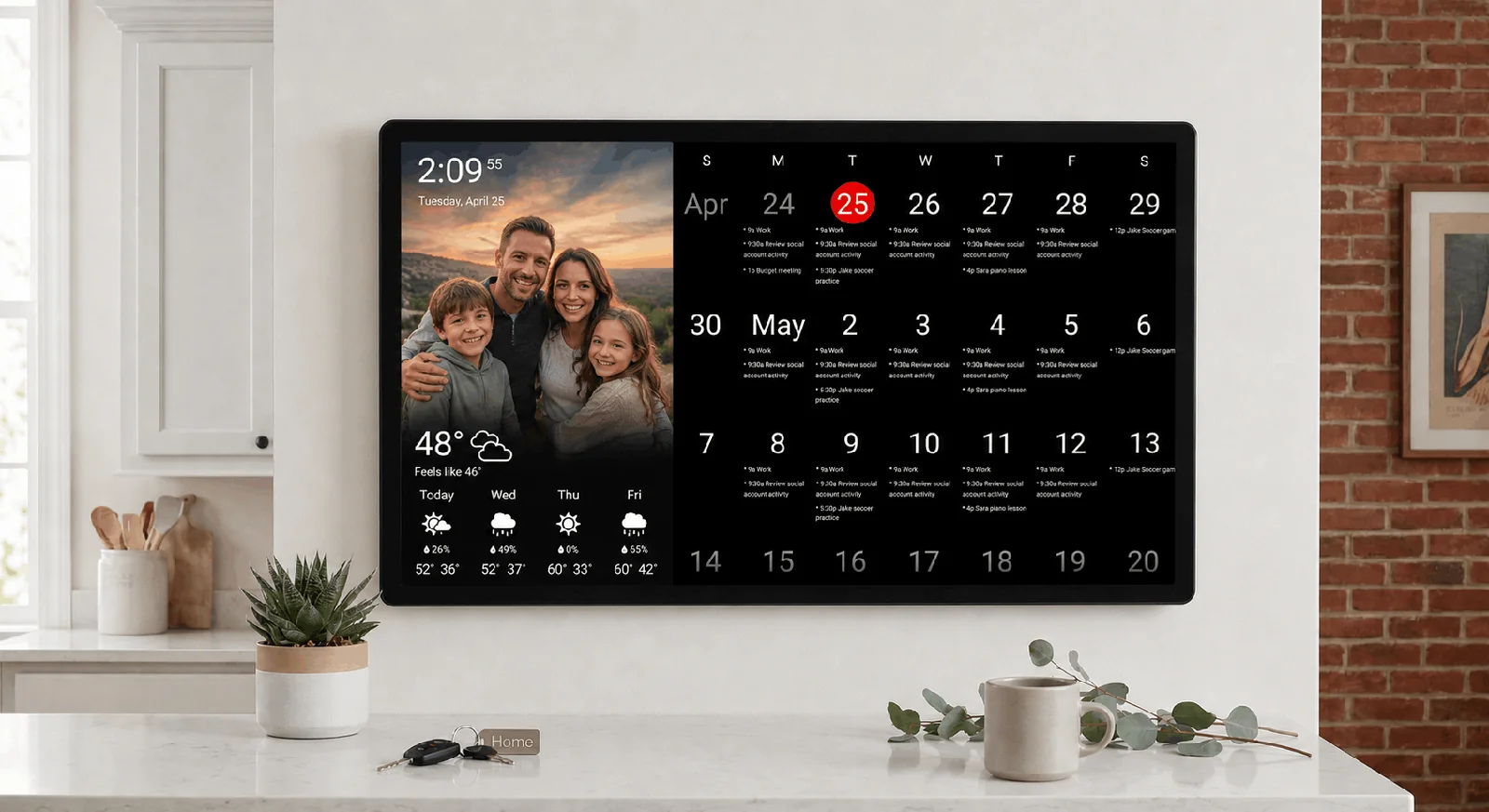

Credit: Skylight
A dedicated touchscreen family organizer - built around its own hardware.
Skylight is a plug-and-play touchscreen organizer for busy households. It runs strictly on its own proprietary hardware (10″, 15″, and 27″ screens) and ships with a closed, curated set of family-management features:
- Color-coded calendar with kid-friendly profiles
- Meal-planning & grocery-list syncing built in
- Interactive chore charts with kid reward systems (Plus tier)
- “Sidekick” AI converts photos of paper schedules into digital events
Skylight’s advantage is simplicity: unbox, mount, sign in, done. What you give up is flexibility, since the layout is fixed, you can’t swap in your own hardware, and photo display or advanced chores need a yearly subscription on top of what you already paid for the screen.
DAKboard vs Skylight, side by side
Every feature that matters, scored honestly. Scroll horizontally on mobile.
| Feature | DAKboard | Skylight |
|---|---|---|
| Use your own hardware? | YesiPad, Android tablet, smart TV, laptop, Raspberry Pi - or our wall display. | NoProprietary tablet / wall display only (10″, 15″, 27″). |
| Calendar syncing | ReliableGoogle, Apple, Outlook, Yahoo, Cozi, iCal - including 2-way sync where supported. | MixedWorks well with Google; users report sync issues with Apple, Outlook, and recurring events. |
| 3rd-party integrations | 100+Calendars, photos, smart home, todos, weather, transit, finance, news, audio & video - plus custom integrations. | < 10Google, Apple, Outlook, Yahoo, Cozi, Alexa (limited), Instacart. |
| Customizable layouts | Pixel-levelDrag-drop colors, widgets, fonts, borders. Resize and position anything. | Very limitedRigid template grids. Color-code only; can’t move or resize blocks. |
| Chores & reward system | Free & paidFree: Todoist, Asana, Google Tasks, Trello, MS To Do integrations. Paid: full customizable chore app with rewards. | Paid onlyBuilt-in chores, but sort order is locked alphabetically - can’t reorder by time of day. |
| Meal planning & grocery | Coming soonCurrently via Plan to Eat, Nutrislice, and other planning integrations. | Built inNative meal planning & grocery sync. |
| Import events from texts / emails | Not yetDAKboard pulls from your calendar apps directly; no OCR-from-photo today. | Yes“Sidekick” AI converts photos of paper schedules into calendar events. |
| Smart-home integrations | DeepSmartThings, Home Assistant, Google Nest, Ecobee, Sonos, Spotify, and more. | LimitedAlexa voice for shopping lists only. |
| Photo slideshow / screensaver | Free tierGoogle Photos, Apple Photos, Amazon Photos, Flickr, Dropbox, Immich - all in the free plan. | Paid onlyPhoto display requires the paid subscription on top of hardware. |
| Starting price | $0/moFree plan available forever. Essential from $5/mo annual. 30-day free trial. | Hardware + $79/yrTouchscreen purchase, plus subscription required for photos & advanced chores. |
Skylight feature data based on public product pages and verified customer reviews. We update this table when either product ships meaningful changes.
5 reasons DAKboard is the best alternative to Skylight Calendar
Skylight is fine. Here’s where DAKboard pulls ahead.
Two-way calendar syncing that actually works.
Both products offer scheduling. But DAKboard’s 2-way calendar sync is far more robust - and it just works, without the bugs and dropouts users routinely report with Skylight.
- Dynamic multi-calendar consolidation. When parents are invited to the same soccer game or meeting, DAKboard’s “Consolidate Events” algorithm recognizes identical names, locations, and times across feeds and merges them into one clean line. Skylight shows duplicates.
- Rolling layout configurations. Unlike Skylight’s fixed monthly grid, DAKboard’s “Rolling Month” view hides weeks that have already passed and shifts the current week to the top - maximum future visibility, every day.
Common Skylight issues
- Slow syncing - new events often take 1 hour to 1 day to appear on the Skylight display.
- Disappearing events - entire schedules can vanish, requiring users to re-authenticate via the mobile app.
- Incorrect event times - recurring or multi-day events frequently show at the wrong time.


Complete hardware freedom & DIY versatility.
Skylight operates on a closed model: their hardware, their software, no exceptions. DAKboard lets you use any device you already own - or buy ours if you want plug-and-play. There are three setups, and any of them gets you running in under an hour:

Buy a DAKboard Wall Display
Best for
- Busy parents
- Non-technical users
Plug-and-play, works out of the box. Software preconfigured, 30 days of Plus included. Reseller frame options to match your decor.

Bring your own device (BYOD)
Best for
- Already own a screen
- Light technical skills
Any screen with a web browser & Wi-Fi - iPad, Android tablet, laptop, smart TV, smart appliance. Run DAKboard in the browser or via our Android app.

Raspberry Pi + DAKboard OS
Best for
- Tech-savvy users
- Maximum flexibility
Download DAKboard OS, flash it to a Pi, connect via HDMI. Pure DIY - tinker, customize, and run exactly the setup you want.

Display what you want, where you want.
Skylight locks you into rigid, templated grids that cannot be altered or resized. DAKboard gives you complete control over what’s on your screen, where it sits, and how big it is.
- Family photos on the left, calendar on the right? Done.
- Weather top-left, traffic bottom-left, agenda filling the rest? Done.
- Swipe between Home Assistant, chores, and the calendar on touch? Done.
- On Skylight: you pick a layout from a closed list - and that’s the whole menu.
Massive ecosystem of 100+ native integrations.
Skylight limits its direct digital connections to fewer than 10 basic tools, relying instead on an AI camera to “read” physical schedules. DAKboard is built to play nice with the software your family already uses.
- Project boards & task managers: Trello, Asana, Todoist, Google Tasks, Microsoft To Do.
- Media & audio: Spotify, Sonos, YouTube, Vimeo, Reddit.
- Smart home: Home Assistant, SmartThings, Google Nest, Ecobee.
- Daily life: traffic, package tracking, airport delays, stock quotes, RSS news, Fitbit, and more.
- Tech-savvy users can build their own custom integrations on top.
Everything updates automatically in the background - no manually texting or emailing photos of paper schedules to your screen.


Photo display - without paying a subscription.
DAKboard’s free plan lets you display photos, sync multiple calendars, and more - without paying a cent. You don’t even need our hardware.
- Free, on any screen: Google Photos, Apple Photos, Flickr, Dropbox, Immich, OneDrive, Amazon Photos.
- On Skylight: photo display is locked behind their $79/year subscription - after you’ve already paid for the touchscreen.
The math: with Skylight, you’re paying for the hardware and the subscription and losing flexibility. With DAKboard, you can start free, use the screen you already own, and only upgrade when you want screens that refresh faster.
What DAKboard flexibility looks like in real homes.
Six different families. Six completely different layouts. Same DAKboard software.

Shared color-coded calendar
One screen, every family member’s schedule, mood-coded so kids can see what’s theirs.

Touch chores & routines
Tap to check off. Kids stay on track without anyone repeating themselves.

Weekly meal plan + grocery list
Pull from Plan to Eat, Nutrislice, or your own list. Native meal planner coming soon.

Weather, tides & alerts
Real-time forecasts, radar, air quality, ocean tides - plan the day, the weekend, the vacation.

Custom layout editor
Drag, drop, resize. Every widget, every font, every color - yours to arrange.

Living photo frame
Rotates through family photos, vacations, and milestones. Free, on the screen you already own.
DAKboard vs Skylight: FAQ
The most-asked questions from families weighing both options.
Can DAKboard run on the screen I already own?
Yes. If your screen has a web browser and Wi-Fi - iPad, Android tablet, laptop, smart TV, even some smart appliances - DAKboard runs in the browser. For screens without a browser (PC monitors, “dumb” TVs), we sell a pre-configured CPU that connects over HDMI. Or you can flash DAKboard OS onto a Raspberry Pi.
Is DAKboard cheaper than Skylight long-term?
For most families, yes - significantly. DAKboard has a free tier forever, paid plans start at $5/month, and you can use hardware you already own. Skylight bundles a hardware purchase with a yearly subscription if you want photos, advanced chores, or AI features.
Does DAKboard work with Apple Calendar and Outlook?
Yes - Apple iCloud, Outlook (Office 365), Google, Yahoo, Cozi, and any ICS feed. Reviews consistently note that DAKboard’s calendar sync is more reliable than Skylight’s outside of Google Calendar.
Can I switch from Skylight to DAKboard?
Most families switch by reconnecting their existing calendar and photo accounts - there’s no proprietary data lock-in on Skylight’s side. If you own a Skylight device, you can keep it as a dedicated frame; for the DAKboard side, pick a tablet, TV, or our wall display.
What if I want Skylight’s “Sidekick” AI feature?
Skylight’s Sidekick lets you photograph a paper schedule and turn it into calendar events. If that’s the deciding feature for you, it’s the one place Skylight pulls ahead. But most families find that pulling directly from Google, Apple, or Outlook calendars (which DAKboard does natively) is the faster everyday workflow.
Is meal planning available on DAKboard?
Native meal planning is on our roadmap. Today, you can display meal plans from third-party tools like Plan to Eat, Nutrislice, and any recipe-management app that publishes a feed.
Skip the closed ecosystem.
Take DAKboard for a 30-day test run using a screen you already own, no purchase necessary. No credit card required, and no proprietary hardware to buy. If it’s not for you, fall back to our free plan and keep the photo display and calendar sync forever.