DAKboard vs Hearth Kid routines are the easy part. Here’s what happens after.
Kid routine trackers all promise the same thing: happier mornings and fewer arguments. What separates them is the hardware you're locked into and what you keep paying after the box arrives. Read on for a full breakdown of both.

Card not needed to start · Full 30 days free · Walk away whenever
The short version
Both do their job well. They're just made for different types of families.
Best for flexibility & long-term value
Pick DAKboard if you want to use your own hardware, customize everything, and never pay a mandatory subscription.
- Use any screen - iPad, smart TV, Raspberry Pi, or our wall display
- 100+ integrations - calendars, photos, smart home, todos, music
- Pixel-level layout control - drag, drop, resize anything
- Smart-home command center - Home Assistant, SmartThings, cameras
- No mandatory subscription - generous free tier, paid plans optional
Best for structured kids’ routines
Pick Hearth if you want a single touchscreen focused on young kids’ habits and don’t mind a yearly membership.
- Plug-and-play 27″ touchscreen - works out of the box
- Gamified routines & star rewards for kids
- “Today’s Feelings” emotional wellness tracker
- “Hearth Helper” AI parses photos of paper schedules
- Proprietary hardware + mandatory $86.40/yr membership
A dashboard shaped around your family’s routine, not ours.
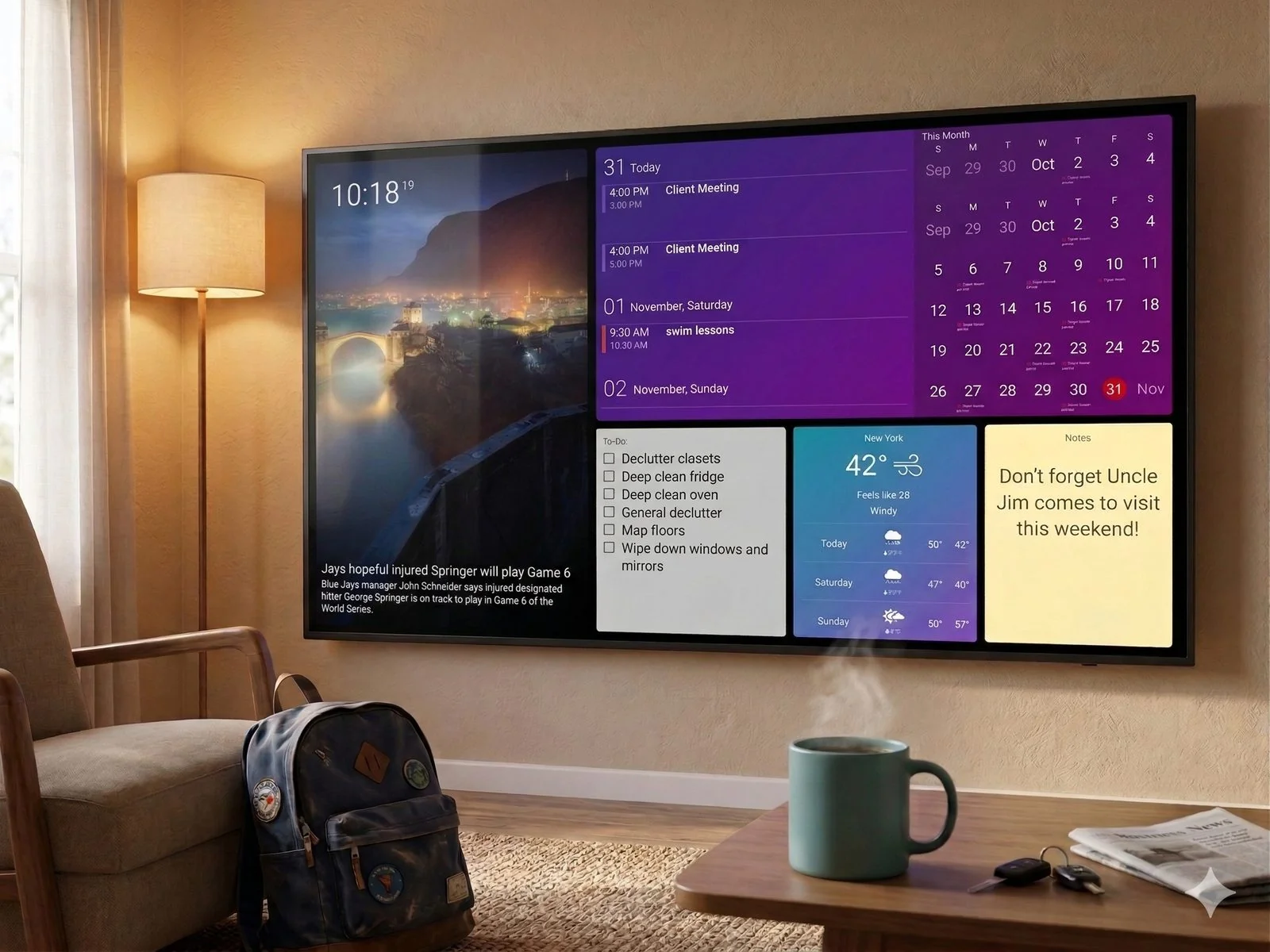
DAKboard is a fully customizable dashboard platform families and small businesses use to run their home or office from one screen. Pair it with over 100 third-party integrations and lay everything out exactly how you want, then use it to:
- Line up everyone’s calendar in a single view, so the whole family knows the plan for the day, week, and month
- Pull up weather, traffic, and delivery updates without opening another app
- Post household chores kids can mark done straight from the touchscreen
- Control smart-home gear through Home Assistant or Samsung SmartThings
- Rotate through family photos from Apple Photos, OneDrive, Flickr, Dropbox, Immich, and beyond
- Track what’s playing on Spotify or Sonos, plus custom feeds and live video
Hardware is entirely your choice. Pick up our official wall display, or turn a spare tablet, smart TV, or Raspberry Pi into a working family hub.

Credit: Hearth
A dedicated 27″ touchscreen built around kids’ routines.
Hearth is a dedicated, interactive 27″ touchscreen organizer and “family rhythm center” built primarily for parents who want to foster childhood independence. Focusing heavily on behavior management and daily habit formation for younger kids, it trades open-ended customization for structured daily workflows:
- Closed, subscription-based ecosystem on its own proprietary hardware frame
- Routine tracking with gamified star rewards and completion streaks
- “Today’s Feelings” child emotional wellness tracker
- Dedicated meal scheduling tool, broken down by family member
- “Hearth Helper” AI extracts data from photos of schedules, menus, and flyers
It’s a rigid setup, though: the signature features stay locked behind an ongoing “Family Membership,” and there’s no way to connect it to a wider smart-home network or rearrange the layout.
DAKboard vs Hearth, side by side
Every category compared, no cherry-picking. Scroll sideways on smaller screens.
| Feature | DAKboard | Hearth |
|---|---|---|
| Use your own hardware? | YesiPad, Android tablet, smart TV, laptop, Raspberry Pi - or our wall display. | NoProprietary 27″ matte wall display only. |
| Hardware required | Your choiceUse your own screen (iPad, tablet, laptop, smart TV), a Raspberry Pi / pre-loaded CPU via HDMI, or a DAKboard Wall Display (22″ & 27″). | 27″ onlyA single proprietary 27″ matte wall display. |
| Calendar syncing | ReliableGoogle, Apple, Outlook, Yahoo, Cozi, iCal. | Yes, but clunkyGoogle, Apple, Outlook, TeamSnap. Users report manual on-screen event entry feels multi-step and slow. |
| 3rd-party integrations | 100+Google, Apple, Outlook, Yahoo, Cozi, Google Tasks, Todoist, Trello, Spotify, Sonos, Immich, Home Assistant, SmartThings, plus custom API widgets. | NoneClosed ecosystem - no native smart-home, productivity, or music integrations. |
| Customizable layout control | Pixel-levelChoose colors, layouts, widgets, fonts. Drag, drop, resize, and position anything - even custom CSS. | Very limitedRigid, unalterable template grid. Color-code profiles only; can’t move, resize, or add blocks. |
| Chore & routine tracker | Free & paidFree: Todoist, Asana, Google Tasks, Trello, MS To Do. Paid: fully customizable native Chores app. | Paid onlyGamified “Routine Builder” with star points and streaks - requires the paid membership. |
| Meal planning tools | Built inNative menu building plus full custom integration via website / iFrame embeds. | Paid onlyDedicated meal scheduling by family-member profile - requires the paid membership. |
| Import events from texts / emails | YesVia automated Zapier, IFTTT, or third-party email task integrations. | Paid onlyVia “Hearth Helper” AI; image-text data requires manually approving each event. |
| Smart-home integrations | DeepSmartThings, Home Assistant, Google Nest, Ecobee, Sonos, Spotify, live IP/RTSP camera streams, and more. | NoneDoes not support smart-home integrations. |
| Mandatory subscription for key features | OptionalGenerous free tier. Paid plans optional for advanced custom multi-screen layouts. | RequiredMandatory Family Membership ($86.40/yr) to use routines, lists, to-dos, rewards, meal planning, and the AI helper. |
Hearth details here are pulled from its published specs and current customer feedback, and we revisit this table whenever either product changes in a meaningful way.
5 places DAKboard has the edge over Hearth
Hearth does what it does well. Here’s where DAKboard still comes out ahead.
Calendar updates that show up instantly, every time.
Both products offer multi-platform calendar syncing, but DAKboard’s underlying data handling is built for speed and complex scheduling workloads - functioning as an immediate, high-performance portal rather than a clunky on-screen form.
- Dynamic multi-calendar consolidation. When several family members are invited to the same school event, DAKboard recognizes identical names, locations, and times across feeds and merges them into one clean line. Hearth shows duplicate clutter.
- Rolling layout configurations. Instead of a static grid, DAKboard’s “Rolling Month” view hides weeks that have already passed and shifts the current week to the top - preserving screen space for future visibility.
Common Hearth friction
- Multi-step entry - creating an event on-screen means tapping a button, then manual date and time boxes, then a profile picker.
- Processing lag - the display has to process and cache each change before it appears.
- Profile-bound events - every entry must be assigned to an individual profile before it’s saved.


Use your own hardware, skip the mandatory membership.
Hearth forces you to buy its expensive 27″ proprietary screen upfront, plus a mandatory annual membership just to keep your daily tools active - cancel, and your lists, chores, routines, and meal tools lock out entirely. DAKboard gives you three flexible tracks instead:

Buy a DAKboard Wall Display
Best for
- Busy parents
- Non-technical users
A stunning, plug-and-play solution that works right out of the box. Software preconfigured on a beautifully framed premium touchscreen, ready to mount.

Bring your own device (BYOD)
Best for
- Upcycling a screen you own
- Light technical skills
Any device with Wi-Fi and a web browser - an old iPad, an Android tablet, a Surface, even a smart fridge - runs DAKboard instantly, no new hardware required.

Raspberry Pi + DAKboard OS
Best for
- Tech-savvy users
- Maximum flexibility
Run a pure DIY monitor or standard “dumb” TV setup using a custom micro-SD card and DAKboard OS for total engineering control.

Arrange the screen exactly how your family needs it.
Hearth locks you into a single fixed template optimized for tracking young children’s habits - you can’t resize blocks, relocate columns, or change how elements look. DAKboard is a true graphic-design-style dashboard canvas.
- Family photos left, weekly calendar right, weather in the corner? Build it.
- Adjust fonts, element opacities, and multiple rotating layout loops. Done.
- Inject custom CSS for a dashboard that matches your interior decor precisely.
- On Hearth: one fixed template - no resizing, relocating, or custom blocks.
True smart-home central command panel.
Hearth treats its display as an isolated bubble, deliberately omitting smart-home functionality. DAKboard acts as the master brain of your entire household through native integrations with open automation hubs.
- Tap to toggle lights, lock doors, and view real-time security camera feeds.
- Monitor Google Nest or Ecobee climate data at a glance.
- Live media layouts tracking what’s playing across your Sonos or Spotify zones.
- Powered by Home Assistant & Samsung SmartThings.
- On Hearth: no smart-home support at all.


Unified, high-performance productivity.
Hearth splits task management into separate, disconnected tabs - switching between a “To-Do” list and a “Routines” page means jumping across screens, and its tasks are basic text listings. DAKboard’s native To-Do & Chores layer works fast and aggregates seamlessly.
- High-utility family checklists run directly alongside your layout widgets.
- Hooks into Todoist, Trello, Asana, and Google Tasks - updating automatically in the background.
- No daily-workflow changes required - keep using the tools you already do.
- On Hearth: to-dos and routines live on separate pages, with sluggish loading between them.
Same software, six completely different homes.
Pick a layout, swap the widgets, make it your own. Here’s a look at what real families landed on.

Everyone’s schedule, one color per person
Kids learn their color fast, and suddenly nobody’s asking whose event is whose.

Build the layout yourself, no template required
Drag widgets into place, resize what needs resizing, and swap fonts until it finally looks like yours.

The week’s menu, planned out loud
Write out dinner plans yourself, or sync in a meal-planning app so the grocery list builds itself.

The weather widget that does more
Radar, air quality, and tide data sit next to the forecast, refreshing on their own all day long.

Your photo library, always on display
Vacation photos and birthday shots take turns on-screen without anyone lifting a finger.

One layout, two jobs: agenda and photos together
Keep this week’s plans up front while family pictures rotate quietly behind them.
Skip the mandatory membership.
Start a free 30-day DAKboard trial on any screen you already have around the house. No credit card, no proprietary hardware, and no yearly fee to keep your tools working - fall back to our free plan anytime and keep your calendar sync and photo display forever.