DAKboard vs Cozyla A smart tablet, or hardware you already own?
Picking a family display usually comes down to one question: buy their tablet, or use a screen you already have? Below, we walk through pricing, features, and hardware options for both so you can decide with confidence.

No card needed to start · free for 30 days · cancel whenever you want
Here's the quick take
Both hold up well. They're just built for different kinds of households.
Best for flexibility & long-term value
Pick DAKboard if you want to use hardware you already own, customize everything, and start for free.
- Use any screen - iPad, smart TV, a $100 monitor + CPU Mini, or our wall display
- 100+ integrations - calendars, photos, smart home, todos, music
- Pixel-level layout control - drag, drop, resize anything
- True smart-home dashboard - Home Assistant, SmartThings, cameras
- Starts at $0 - generous free tier, no mandatory subscription
Best for tablet-style touch & voice
Pick Cozyla if you want a big Android touchscreen with apps and voice, and don’t mind buying their hardware.
- Big Android touchscreen - 15.6″ to 32″
- Google Play Store apps - YouTube, Netflix, games
- Built-in mics - Google Assistant & Alexa voice
- Built-in chore charts with points & rewards, subscription-free
- Proprietary hardware only - $349.99–$1,099.99, no BYOD
One dashboard, built around how your household actually runs.
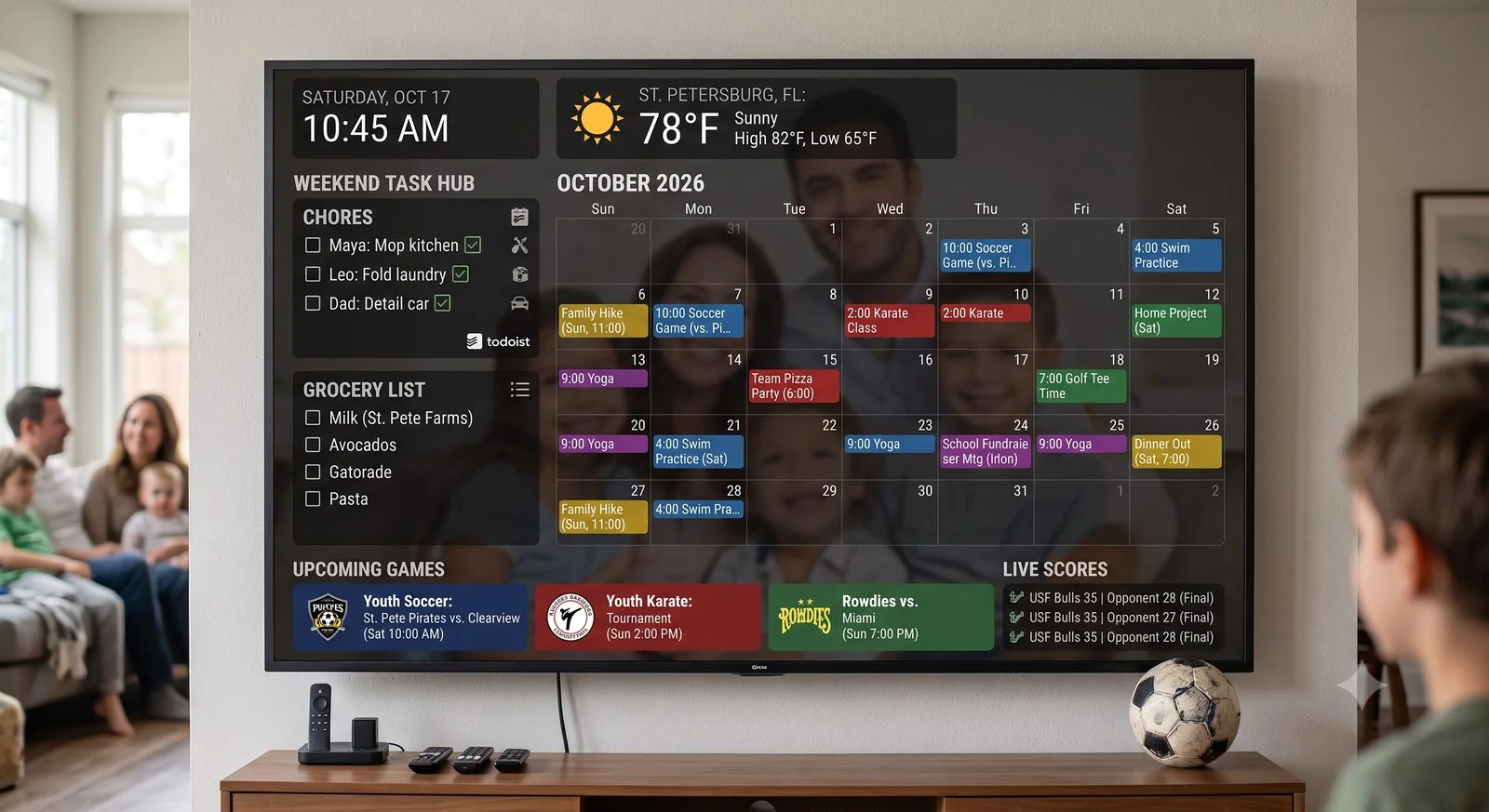
DAKboard gives busy families a digital calendar and command center that bends to fit their routine instead of the other way around. Connect it to over 100 apps you already use and build a home dashboard that can:
- Show everyone’s schedule side by side, so no one misses where they need to be that day, week, or month
- Surface the weather, local traffic, and package deliveries the moment you glance at the screen
- Track a daily chore list your kids can check off right on the display
- Adjust the thermostat or lights without leaving the couch
- Cycle through family photos pulled from Apple Photos, Google Photos, OneDrive, Dropbox, and more
- Show what’s playing on Spotify or Sonos in real time
The hardware is up to you. Mount one of our ready-to-hang wall displays, or run everything completely free on an old iPad, a smart TV, or a spare monitor you already own.

Credit: Cozyla
A large Android touchscreen that acts like an oversized wall tablet.
Cozyla (the flagship Cozyla Calendar+ 2 series) is a large, interactive touchscreen wall calendar built on Android. Available from 15.6″ up to a massive 32″, it essentially looks and acts like an oversized iPad mounted to your kitchen wall:
- A preset system of built-in family tools - color-coded calendars, recipe-linked meal planning, and chore charts
- No monthly or annual subscription fees
- Runs like a giant tablet - download standard mobile apps (YouTube, Netflix) right onto the screen
- Heavy focus on hands-on tapping, voice commands, and kitchen entertainment
The catch is that you’re working inside a fixed tablet-style grid instead of building your own layout, and the screen itself only comes from Cozyla.
DAKboard vs Cozyla, side by side
A full rundown, category by category. Scroll sideways if you’re on mobile.
| Feature | DAKboard | Cozyla |
|---|---|---|
| Use your own hardware? | YesiPad, Android tablet, smart TV, laptop, monitor + CPU Mini - or our wall display. | NoMust buy Cozyla’s proprietary frames; no option to reuse devices you own. |
| Upfront hardware cost | Starting at $0Free ($0): a screen you own. Budget ($99.95): CPU Mini turns any cheap monitor into a view-only calendar. Premium ($600+): wood-framed wall monitors. | $349.99–$1,099.9915.6″ $349.99 · 24″ $699.99 · 32″ $899.99–$1,099.99. Hardware purchase required. |
| How the system runs | Web-based & lightweightRuns through a simple app or browser - fast and crash-free. | Full tablet systemActs exactly like a massive, wall-mounted Android tablet. |
| Mandatory subscriptions | NoneHighly capable free tier. Optional paid plans only for multiple rotating layout screens. | NoneAll built-in tools - calendars, chores, meal planners, photo screensavers - are free forever. |
| Calendar syncing | Reliable+Google, Apple, Outlook, Yahoo, Cozi, and web calendars. Auto-merges duplicate events and hides past weeks. | YesGoogle, Apple, Outlook, Yahoo, and standard web calendars. |
| Control over the layout | Pixel-levelDrag, drop, and resize anything - bigger photos, calendar exactly where you want, your colors and fonts. | LimitedFixed template. You can rearrange tablet-style squares, but can’t redesign or shrink/grow the layout boxes. |
| Access to an app store | By designFocuses on built-in, dedicated info screens to avoid clutter - no app store. | YesFull Google Play Store access for standard mobile apps (YouTube, streaming, games). |
| Chore & routine tracker | Free & paidClean digital checklist family members view or check off right on the screen. | Built-in & freeInteractive chore chart with kid points and customized family rewards. |
| Smart-home connections | Whole-home viewReal-time updates from SmartThings or Home Assistant - thermostat, garage door, lights, right on the dashboard. | App-onlyNo unified widgets. A “Split Screen” mode runs a smart-home app next to your calendar - two separate apps on one monitor. |
| Voice commands | NoSchedules and updates are managed from your phone, laptop, or direct touchscreen typing. | YesBuilt-in microphones for hands-free Google Assistant or Amazon Alexa. |
Cozyla details here reflect its published specs and current customer feedback, and we revisit this table whenever either product changes in a meaningful way.
5 ways DAKboard beats Cozyla Calendar for everyday families
Cozyla isn’t a bad product. It’s just built for a different kind of home.
An organized home dashboard vs. a clunky wall tablet.
Because Cozyla is essentially a giant tablet on your wall, using it means the same constant tapping and app-switching as your phone. DAKboard functions as a single, perfectly unified Home Command Center - no apps to open, close, or minimize.
- One beautiful, self-updating screen. Family photos, multi-person calendars, local weather, and to-do lists are neatly arranged together and refresh on their own.
- No digital distraction. It’s a calm command center, not a TV the kids fight over.
Common Cozyla friction
- Constant tapping & app-switching - swipe between windows or open separate apps to check a chore list, recipe, or schedule.
- Screen clutter - easily becomes a digital distraction if the kids treat it like a television.
- No single auto-updating view - you manage the screen instead of it managing itself.


Use what you already own & save hundreds of dollars.
Getting started with Cozyla means a major upfront investment - their hardware frames scale up to nearly $1,100 for the largest model. DAKboard puts budget and hardware choices back in your hands with three flexible tracks:

Upcycle your old screens
Best for
- Screens you already own
- Spending $0 on hardware
Have an old iPad in a drawer, an Android tablet, or a smart TV in the kitchen? Open its web browser and turn it into a high-end command center instantly - without spending a penny.

The “parent hack” monitor
Best for
- A big view-only calendar
- Saving vs. a $700 tablet
Grab a sleek 24″ monitor for ~$100, plug in our $99.95 CPU Mini, and control it all from your phone. Want hands-on touch instead? Upgrade to the $119.95 CPU v4 box.

Premium DAKboard Wall Display
Best for
- A designer, ready-to-hang look
- Plug-and-play simplicity
Prefer a finished piece? Our luxury wood-framed smart wall monitors arrive preconfigured and ready to mount for a premium, decor-friendly display.

Design a display that matches your home perfectly.
Cozyla confines you to a standard tablet-style grid - you can change colors or text sizes, but not the actual structure of the screen. DAKboard gives you a digital blank canvas.
- Giant calendar on the right, a rotating gallery of your kids’ photos on the left? Set it up in minutes.
- Choose beautiful fonts and adjust background transparency for a display that feels like home decor.
- On Cozyla: a fixed tablet grid - cosmetic tweaks only, not structural ones.
A true smart-home command station.
Cozyla lets you install smart-home apps, but they run completely separately from your calendar view - even split-screen is just two phone apps stretched side by side. DAKboard centralizes your whole home under one cohesive design.
- View your thermostat, check the garage door, or control lights directly inside your main calendar screen.
- Display live security camera feeds right next to your daily schedule.
- Connects directly with Samsung SmartThings & Home Assistant.
- On Cozyla: smart-home apps run as separate windows, not one integrated dashboard.


Zero-maintenance, set-and-forget software.
Because Cozyla runs on a heavy mobile OS, it needs the same upkeep as a smartphone - background updates, memory clearing, and apps that stretch awkwardly on a vertical wall monitor. DAKboard is incredibly low-maintenance.
- All customization happens on your phone or laptop; the wall display simply streams the finished, perfectly formatted layout.
- A rock-solid terminal that runs smoothly day after day - no lagging, freezing, or crashing.
- On Cozyla: ongoing phone-style maintenance and apps that don’t always fit a wall monitor.
A blank canvas that turns into six different things.
Cozyla gives you one screen. DAKboard gives you a blank canvas - here's what six households built with it.

A calendar the whole family reads at a glance
Every family member gets their own color, so even the youngest kid can spot their stuff on the board.

Shape the layout to fit your family
Pick your widgets, size them how you like, then pick the fonts and colors to match - it's your board.
Dinner, sorted for the week
Set up meals right in DAKboard or pull them in from a planner you already use, list included.

Way beyond a five-day outlook
Check the radar, air quality, and tide charts right alongside the forecast before anyone walks out the door.

Let the photos do the talking
A free-running slideshow of your favorite shots, right on the hardware you've already got.

Two layers, one screen: agenda and photos
The week's plan layers over rotating photos, so the screen always feels alive instead of static.
Skip the thousand-dollar wall tablet.
Give DAKboard a spin, free for 30 days, right on the screen you've already got sitting around. No credit card. No proprietary hardware. Start at $0, and only spend on a screen if and when you want one.